



This review isn’t about picking sides; it’s about helping you decide if HoneyBook is the right fit for your business. Whether you’re looking for more revenue, time back in your day, or a simpler way to manage your clients, I’ll be sharing the key features, pros, and cons of HoneyBook, as well as who I think it’s best suited for. Let’s dive in!
How I Got Into Setting Up/Using HoneyBook
When I first launched my business in 2020, I quickly realized the importance of having a reliable CRM to manage client relationships, bookings, and projects. At the time, Dubsado was my go-to tool, and it served me well in building a strong foundation. But in 2022, something caught my eye: HoneyBook. Its reputation for simplicity, user-friendly design, and quick setup process had me intrigued. So much so, that I dove in and nearly completed an entire setup in just one day!
While I ultimately chose to stick with Dubsado for my own systems (mainly due to its advanced automation capabilities), I couldn’t help but appreciate HoneyBook’s charm. Its clean interface and streamlined workflows make it an ideal choice for many creative entrepreneurs looking to get organized. They’ve also added a lot of amazing features this year that quite frankly Dubsado hasn’t caught up to yet. (More on this later.)
In fact, HoneyBook impressed me so much that I’ve added Done-for-You HoneyBook Setups as a service in my business. I’ve also been rebuilding my own HoneyBook account. This way if someone signs up to have me build their HoneyBook account, they’ll see exactly how I deliver an exceptional client experience using the same CRM. Want to learn how you could improve your customer experience with HoneyBook? Book a free 15-minute discovery call with me. I’ll help you with some ideas to save you hours each week AND improve your client experience.
What is HoneyBook?
HoneyBook is a client relationship management (CRM) platform designed specifically for creative entrepreneurs and small business owners. It’s an all-in-one tool that helps you manage your client flow—from inquiries and proposals to contracts, invoices, and payments. With its intuitive design, HoneyBook makes it easy to streamline your business processes, stay organized, and provide a seamless experience for your clients. It’s particularly loved for its user-friendly setup, drag-and-drop templates, and built-in payment system that simplifies getting paid. Whether you’re a photographer, event planner, designer, or coach, you’ll have the essential tools you need to save time and focus on growing your business.
Why I Recommend HoneyBook to My Clients
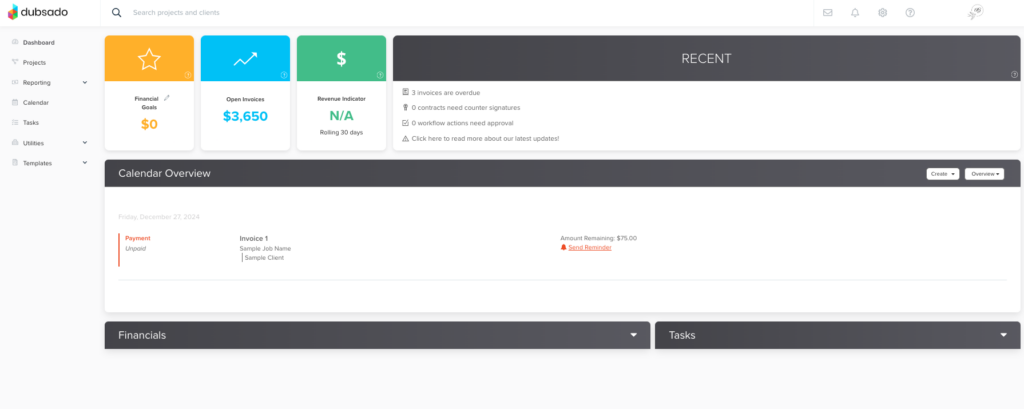
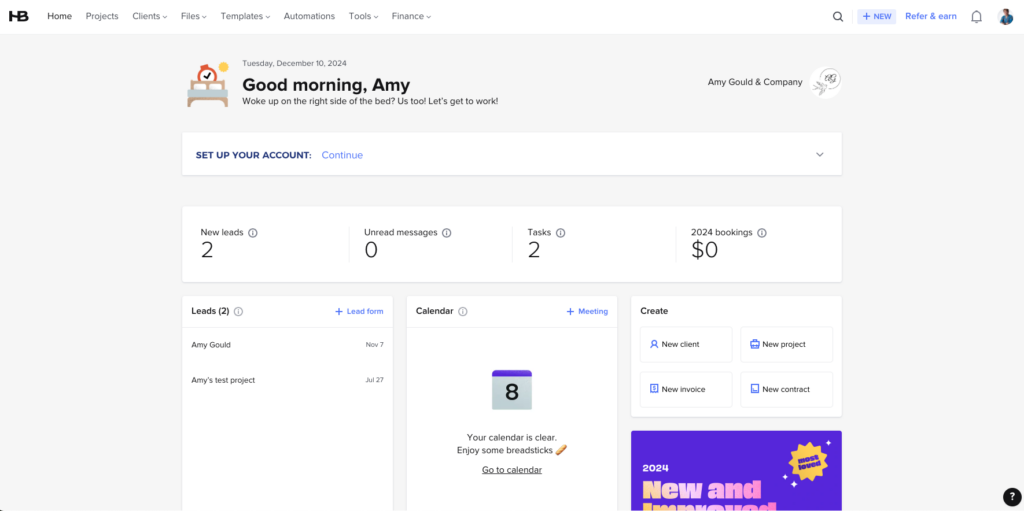
- One of my favorite reasons to recommend HoneyBook is it’s ease of use and the way it’s organized. It feels light and easy and is less overwhelming visually than Dubsado.
- The learning curve is less steep with HoneyBook compared to Dubsado.
- HoneyBook’s guided set-up helps you get up and running quickly. (If you really want to get the most out of it, I recommend working with me on your setup.)
- HoneyBook integrates with Calendly and because of that, gives clients more variety when setting up the calendar.
- It allows mass emailing, unlike Dubsado. If you’re not looking to get into email marketing, but want the ability to mass email all of your past clients, this is a great feature.
- It integrates with Pic-Time. Photographers, if that’s your tool of choice, you might want to start there.
- If you have a team and you want different people to have different signatures or be able to connect their calendar to book appointments for themselves, HoneyBook has these features. Dubsado doesn’t have a workaround for this.
- If you’d like to use if/than logic in your workflows. HoneyBook has this feature now.
Why HoneyBook Might NOT Be The Best Fit For You
My HoneyBook review wouldn’t be complete if I didn’t tell you my reasons why it might not be the best fit for you.
- You want more flexibility with your automation.
- HoneyBook is only available in the US and Canada. (If you’re outside of those two areas, I recommend Dubsado.)
- You don’t like the feel of the platform.
If you’re wondering if HoneyBook is the right fit for your business, book a free 15-minute discovery call with me, and let’s chat about it. I’ll help you figure out which CRM is the best fit for you.

My Favorite Features in HoneyBook
I’ve already named a few of my favorite features that cause me to recommend HoneyBook, however, I have a few favorites of my own.
The new AI tool is super helpful!
When I read all about the new AI tool that was added this year, my mind was blown! I had to include it in my HoneyBook review. Here are just a few things it can do.
It helps you prioritize leads and respond faster. In fact, HoneyBook will draft a response email for you. You’ll just need to edit it and hit send. How’s that for speeding up lead response time? Not only that, but HoneyBook will send you a summary of all project communications, payments, and details automatically an hour before your meeting.
The new AI feature also allows you to stay fully present during the meeting because the AI assistant takes care of note-taking. Within minutes after each call, you’ll receive a detailed meeting summary with action items that can turn into tasks with one click. These are things I’ve actually paid to have added to my meetings in the past.
The Mobile App is Amazing for Handling Work on the Go
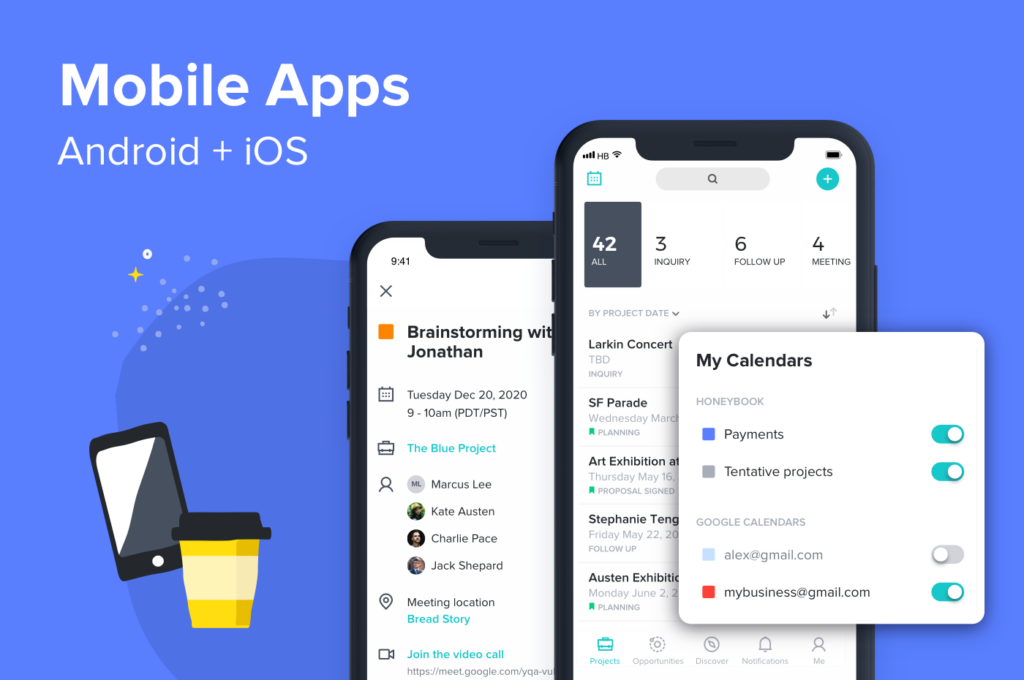
Dubsado has a mobile app. It’s just been released in 2024. New features are being added, but it’s not at the level that HoneyBook is at yet. HoneyBook’s app is really well done and allows you to manage a lot of your client work on the go. (I honestly don’t feel that that should be the reason you choose a CRM, but you should choose things that are important to you and the way you work.
The Scheduler
Dubsado’s scheduler is great, but can be a bit clunky at times. Especially when it comes to scheduling mini-sessions. HoneyBook’s scheduler allows you to sync multiple calendars for multiple team members and accept payment when booking just like the Dubsado scheduler, but is a bit more streamlined when it comes to booking mini-sessions.
SMS Confirmations and Reminders
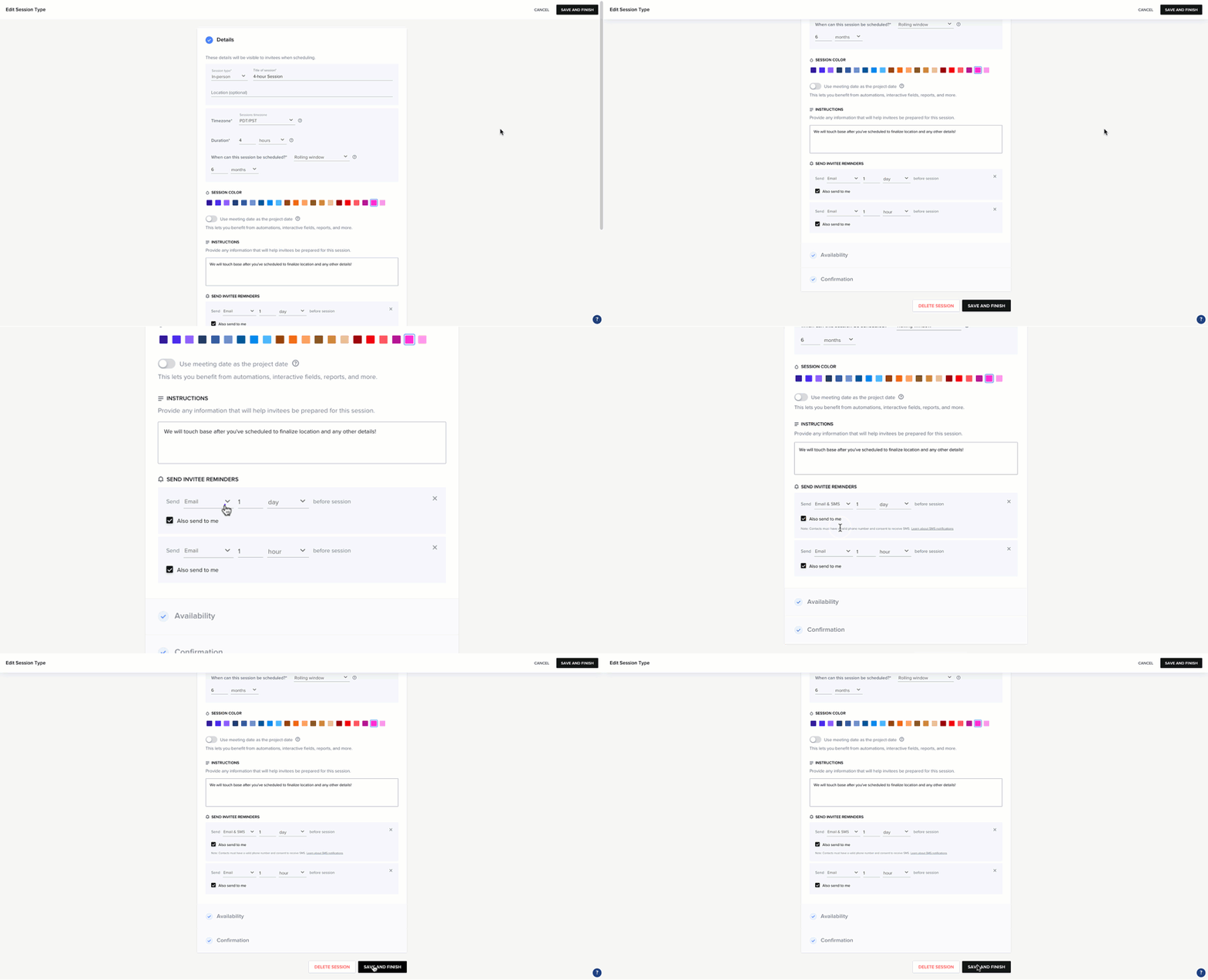
I WISH Dubsado had this. You can create something like this with using the Zapier integration in Dubsado, but I LOVE anything that’s directly built into a system, because it just eliminates the possibility of a break down between systems. HoneyBook allows you to send SMS confirmation and reminder messages for appointments and payments.
Automatical Late Fees and Allowing Clients to Choose a Payment Plan
Both late fees and payment plans have required me to actually do the thing. Let’s be honest, I didn’t do a lot of late fees because of that. Additionally, I had to agree to a payment plan and set it up before sending it to a client which required extra work from me. (Sometimes A LOT of extra work.) both of these are a thing of the past with the upgrades that HoneyBook made this year.
Automation
HoneyBook has some great automation features that help you automate every part of your client experience from lead to offboarding.
One thing that was added this year that got me really excited was conditional logic. Here’s an example of conditional logic in your automation. This means that you can have HoneyBook wait for someone to book an appointment and then send them a planning guide. If they don’t book in two days, you can have it send them a follow-up message to remind them to book an appointment.
Smart files
I absolutely LOVE smart files, because you’re not limited to the specific options given for Dubsado proposals for instance, you can create a booking document with the invoice and contract in the order that you’d like. Want your clients to view the invoice BEFORE signing the contract? No problem. Want them to book an appointment as a part of your booking process? You can do that too.
Get Started with HoneyBook
HoneyBook’s user-friendly features make it a fantastic option for creative entrepreneurs who want to save time, stay organized, and wow their clients without feeling overwhelmed. Whether you’re looking for seamless workflows, smarter automation, or a polished mobile app to manage tasks on the go, HoneyBook delivers in spades.
If you’re ready to explore how it can transform your client experience, here are a few tips to help you get started:
- Sign Up for a Free Trial
HoneyBook offers a free trial so you can explore its features and see how it fits your business needs. During this period, play around with the features like Smart Files, automation, and the scheduler to see how they can save you time. In fact, up until recently, my HoneyBook account was on the free plan. (That was for over two years!) - Set Up Your Brand & Templates
Start by customizing your account with your branding. Upload your logo, choose your brand colors, and create templates for emails, invoices, and contracts. This will allow you to keep things consistent and save time in the long run. - Organize Your Clientflow
Use the guided setup to map out your clientflow—from inquiries to project completion. Whether it’s onboarding, scheduling, or collecting payments, you can streamline the process to fit your business model. - Take Advantage of Smart Files
Create streamlined, visually stunning documents that allow clients to review proposals, sign contracts, and make payments all in one place. Smart Files can drastically improve your booking process and make a great first impression. - Leverage Automation
HoneyBook’s automation tools are perfect for simplifying your workflows. Set up automations for email follow-ups, appointment reminders, or lead responses to ensure no client slips through the cracks. - Join the HoneyBook Community
HoneyBook’s online community and resources are invaluable. From Facebook groups to support webinars, there’s plenty of help available as you get comfortable with the platform.
👉 Pro Tip: Use my referral link to get 30% off your first year if you decide to upgrade to the paid plan: Get Started with HoneyBook. Not only will you save money, but you’ll also unlock the potential to save hours every week while wowing your clients.
Is HoneyBook Right for You?
I hope this HoneyBook review was helpful! It might not have every bell and whistle that advanced users need, but it excels in making your business more organized and client-friendly without being overwhelming and complicated. Its user-friendly interface, smart automation, and unique features like AI Assistant, conditional logic, and SMS reminders are hard to beat.
However, if you need deeper automation, operate outside the U.S. or Canada, or prefer a different system, it’s worth exploring alternatives like Dubsado. Still not sure? Let’s chat! Book a free 15-minute discovery call with me, and I’ll help you determine whether HoneyBook is the right CRM for your business.
A Tool Built for Creative Entrepreneurs
HoneyBook is a game-changer for creative entrepreneurs who want to elevate their client experience without the headache of juggling multiple systems. With features designed to help you manage your clientflow with ease, this platform offers something for photographers, event planners, coaches, and beyond.
When paired with strategic setup and personalized workflows, you could save hours every week, simplify client interactions, and focus on what you do best—delivering your craft.
Are you ready to transform your business with HoneyBook? Let’s get started!
Author: Amy Gould
Amy Gould is a HoneyBook educator and certified Dubsado specialist who helps creative service providers work less, make more, and WOW their clients with smart systems and automation. When she’s not helping entrepreneurs elevate their businesses, you’ll find her enjoying life in a small beach town in Michigan with her four cats, two dogs, and a big cup of coffee.
Disclaimer: My policy is to only share products and resources that have brought value to me and/or I believe will bring value to my audience. Some of the links in this post are affiliate links, and I will earn a commission if you make a purchase using them.




+ view comments . . .