

You’re booking clients.
Your business is growing.
But behind the scenes, things feel… chaotic.
On a recent call, a client told me, “I’m not organized in the background, but I make it happen.”
Honestly? That works… for a while.
But there comes a point where your business grows faster than your systems. The duct tape starts to peel, the cracks start to show, and suddenly, your days are spent babysitting your tools instead of serving your clients.
If you’ve been wondering how to manage a small business without burning out, it might not be about trying harder. It might be that you’ve simply outgrown your current client management system.
Let’s walk through seven telltale signs it’s time for an upgrade (and what that really means for you and your business).

A Quick Summary of This Post if You’re Short on Time
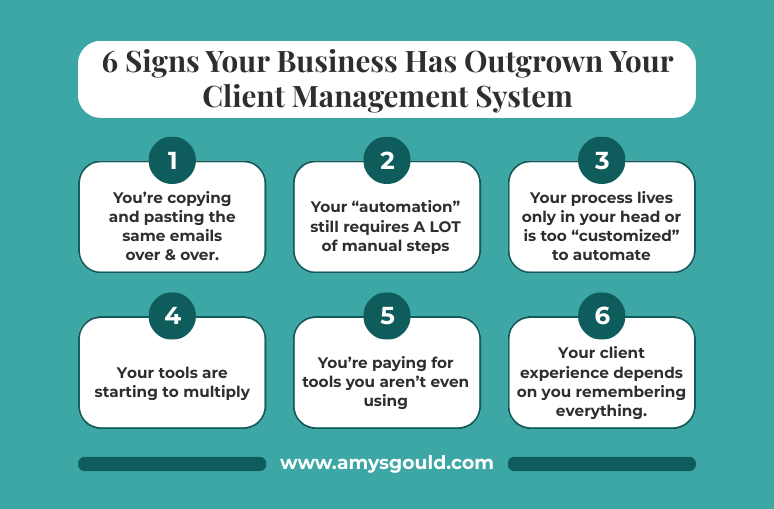
If you’re constantly copying and pasting emails, “fixing” your automations, keeping your entire process in your head, juggling too many tools, paying for systems you don’t use, relying on your memory for every client touchpoint, and feeling completely maxed out, your business has likely outgrown your current client management setup. You don’t need more hustle. You need a streamlined, strategic client management system for small business that actually supports the way you work, saves your brainpower, and gives your clients a consistently great experience.
In Case You’re New Here Let Me Introduce Myself

Before we dive into the signs, let me introduce myself so this all feels a little less like advice from a stranger on the internet and a little more like a conversation with someone who’s right there in the trenches with you.
I’m Amy, the founder of Amy Gould & Company, based in Grand Haven, Michigan. I help creative entrepreneurs (photographers, home stagers, jewelry designers, and other wonderfully talented service providers) build systems that actually work in real life.
I specialize in Dubsado and HoneyBook setups, systems strategy, workflow templates, and courses designed to simplify Small Business Client Management. In plain English: we help you stop duct-taping your back end together so you can serve your clients better, work less, and finally feel like the CEO of your own business.
Now, let’s talk about the seven signs your business has quietly (or not so quietly) outgrown the system you’re currently using.
#1. You’re Copying and Pasting the Same Emails Over and Over
On one of my calls, Stephanie told me, “I’m currently emailing a lot of my clients.” Then she added, almost sheepishly, “I’ve had people with six-figure businesses copying and pasting emails.”
Spoiler: she is absolutely not alone. I’ve talked to numerous people who are in the exact same boat.
If your version of Small Business Client Management is hunting through Google Docs for that “one email you always send,” then copying and pasting it into yet another message, your system is waving a giant red flag at you.
In real life, this usually looks like typing the same instructions every time a client books, manually sending appointment reminders, re-answering the same questions in slightly different words, and rewriting variations of the same “Yay, you’re booked!” email for every new client.
It’s not that it doesn’t work. It does. But it’s expensive in a different currency: your time and your mental energy.
No matter how little time you think something takes. I promise you it takes longer. Plus, as I often tell clients, “When things live in your brain, they’re taking up real estate that could be used for other things.”
That’s the real cost here. All those little “don’t forget to send that” tasks clog up your focus and creativity. A good client management software for small businesses should be doing this repetitive work for you automatically, so your brain can get back to being the CEO, not the copy-and-paste assistant.
#2. Your “Automation” Still Requires Manual Steps
This one is sneaky because on paper, you technically have automation. In reality, you’re still doing the heavy lifting.
Michelle described it perfectly on a call: “Basically, what I’m doing right now is I apply the workflow manually after the consultation is scheduled. Then I have to go into the email and type the date.” She even said, “I know I shouldn’t have to do that.”
She’s right. She shouldn’t.
This happens a lot with platforms like Dubsado or HoneyBook when they’re only half set up. The tools are powerful, but if the workflows aren’t mapped correctly, you end up being the missing link. You’re the one manually applying workflows every time a form comes in, editing the date and time in “automated” emails, double-checking that reminders actually went out, and hovering over your small business client database, making sure everything fired correctly.
On that call, I told her, “That’s sucking up a lot of time doing all that.” Because it is.
Automation that still needs you to hover and tweak isn’t true automation. It’s glorified delegation… to yourself. A properly designed client management system for small business should trigger the right emails, reminders, and tasks automatically, based on what your clients do (or don’t do). You set it up once; it runs every time (and it fills in the information for you without you having to do a thing.)
“Basically, what I’m doing right now is I apply the workflow manually after the consultation is scheduled. Then I have to go into the email and type the date. I know I shouldn’t have to do that.”
From a recent Workflow Strategy Session
#3. Your Process Lives Only in Your Head
Another client shared something I hear all the time: “Even I do things differently from the other coaches.”
That one sentence says so much.
When your process only lives in your head, no one else can see, follow, or improve it. That makes it almost impossible to scale, delegate, or create consistent client experiences.
Here’s what tends to happen when your process isn’t documented or systemized:
- Team members all “do their own thing,” follow-ups happen… unless you get busy.
- Clients have different experiences depending on who they talk to.
- You feel weird about taking a vacation because everything depends on you remembering all the steps.
Automation cannot work without a clear, repeatable process. That’s just the truth.
This is usually the point where I walk clients through their entire client journey. From first inquiry to offboarding, we literally write down every single step. Once it’s out of your head and into a clear workflow, we can build a client management system around it. That’s when tools like Dubsado or HoneyBook stop feeling confusing and start feeling like magic.
If you’ve been Googling “how to manage a small business without losing my mind,” this is one of the most important shifts you can make: get your process out of your brain and into a system.
#4. Your Tools Are Starting to Multiply (And Overlap)
On another call, a client rattled off her tech stack: GoHighLevel, Dubsado, Trello, VacationCRM, Travify… and a few more sprinkled in for good measure.
Then she said, “It’s all these systems that are costing me fortunes.”
This is a super common season of business growth. You start with one tool. Then you need scheduling, then invoicing, then a form builder, and then a project tracker. Each new need gets patched with a new platform.
Before you know it, you’re scheduling in one tool, your small business client database lives in another, onboarding forms are collected somewhere else, project tracking is in Trello or Asana, and payments are processed in yet another system.
None of them is really talking to each other, and you are the human bridge between them all.
At first, these tools feel like they’re solving individual problems. But as you grow, the overlaps start creating friction. You’re entering the same client information five times. You find yourself trying to remember which tool has the most up-to-date info. You’re paying for features in three places and using them in one.
A well-designed client management software for small business is about consolidation and connection. It doesn’t mean you’ll only ever use one tool, but it does mean the core of your client journey lives in one central place (and everything else plays nicely with it).
#5. You’re Paying for Tools You Aren’t Even Using
One of the biggest tells that you’ve outgrown your current setup? You start paying for the “next level” tools… and then never actually use them.
Another client of mine told me, “I’m literally paying for two systems right now,” then added, “I have not used Dubsado at all yet.”
If that’s you, you are in very good company.
This usually happens when you try to DIY your new system, get overwhelmed, and quietly back away; you hired someone to set it up, but the project never really got finished; or you migrated halfway, got busy with client work, and the old system kept limping along… so you stayed there.
Now you’ve got double expenses and still feel like your client management lives in 17 different places.
The problem here isn’t that you picked the wrong tool; it’s that the transition never got fully supported. Moving into a new client management system for small business isn’t just “plug in the template and go.” It requires mapping your process, customizing the workflows, migrating your data, and making sure it actually fits the unique way you serve your clients.
Once that’s done, though? You get to stop paying for systems you don’t touch and start fully using the one that actually supports your business.
#6. Your Client Experience Depends on You Remembering Everything
At one point, a client of mine said, “Right now I’m piecemealing everything.”
If that sounds familiar, you probably feel like the entire client experience is held together by your memory. Nothing happens unless you remember to send a follow-up after a discovery call, remind them of their session or deadline, collect important information and questionnaires, send prep guides, contracts, or next steps, and follow up on unpaid invoices or rescheduled appointments.
When your system isn’t handling Small Business Client Management, the business owner becomes the system. And that is a fast track to exhaustion.
The truth is, a consistent, elevated client experience should not rely on you having a good brain day. It should be built into your workflows.
Imagine this instead:
- A new inquiry comes in. Your CRM automatically sends a warm, branded response with a link to book a call.
- Once they book, your system sends confirmation details, appointment reminders, and a questionnaire.
- After they say “yes,” they get a welcome email, contract, invoice, and next steps (without you touching a thing).
That’s what a strong client management software for small business is designed to do. It protects your client experience from your busiest seasons—and gives your clients a smoother journey from start to finish.
#7. You’re Starting to Feel the Weight of It All
At some point, the tech frustration stops being about technology and starts being about your life.
That’s something I hear from potential clients at least once a week: “I can’t handle it anymore.”
Usually, that moment comes when your business has grown quickly, your workload has increased, and your manual, patchwork system just doesn’t scale with you.
Another thing I hear a lot. “When I walked away from my old job, I said I wasn’t going to work all the time… and now I’m doing it again.”
That one hits, doesn’t it?
This is the deeper reason systems matter. It’s not about being a “tech person” or having the flashiest client management system for small business. It’s about building a business that supports the life you actually want—not one that recreates the burnout you promised yourself you’d never repeat.
A streamlined small business client database, thoughtful automations, and a clear workflow are some of the most powerful tools you have for reclaiming your time. They’re how you go from “I’m just trying to keep up” to “My business can grow, and I’m not terrified of more clients.”
Conclusion: Your Business Has Grown! Now Let Your Systems Catch Up
If you’re copying and pasting emails, manually “helping” your automations, keeping your process in your head, juggling too many tools, paying for systems you don’t use, relying on your memory for every client touchpoint, and feeling completely over it… your business has probably outgrown your current system.
That’s not a failure. It’s a milestone. (It’s definitely something worth celebrating!)
It means what you’ve built is working. People want what you offer. Your next step isn’t to hustle harder; it’s to upgrade the way your business runs behind the scenes.
This is where a strategic, well-built client management system for small businesses, using platforms like Dubsado or HoneyBook, can change everything. It’s how you move from chaos to clarity, from “I make it happen” to “My systems make it happen.”
If you’re ready to stop piecing things together and start feeling supported by your systems, this is the perfect time to step back, re-evaluate, and build something that can grow with you.
Because the goal isn’t just to manage a small business. The goal is to run a sustainable, profitable, life-giving business and let your systems do the heavy lifting in the background. Book a Discovery Call with me and let’s chat about how I can help you create systems that’ll support your business where it is now (and in the future).


+ view comments . . .