


I feel much better about Dubsado 3.0 than I did in November of last year. Dubsado has been putting a lot of work into fixing the bugs that originally made me tell my clients to hold off. Plus, they have some amazing new features in the works (based on their roadmap) like multiple clients on one project, Kit/Flodesk integrations, multiple page forms, AI integrations, and more.
Estimated reading time: 12 minutes
Table of contents
- In Case You’re New Here… Hi, I’m Amy Pearson!
- 1. Multiple clients on one project. FINALLY.
- 2. The new form builder + multi-page forms
- 3. Dubsado checkout could open up some REALLY interesting options
- 4. Native Kit + Flodesk integrations
- 5. Project-level payment overrides are coming back
- What else is coming to Dubsado 3.0?
- So…should you switch to Dubsado 3.0 from 2.0?
- There’s no prize for being the first one over to Dubsado 3.0
- What I’m still waiting for
- Frequently Asked Questions
- I’m much more excited about Dubsado 3.0 than I was earlier this year
When Dubsado 3.0 first launched, I wasn’t exactly shouting from the rooftops that everyone needed to switch.
There were a lot of things that just weren’t ready yet.
But I’ve been using 3.0 and building client systems in it for months now, and I’m much more excited about where Dubsado is headed than I was a year ago.
Dubsado recently shared a pretty hefty roadmap of what’s coming to 3.0, and there is a LOT on it: a completely rebuilt form builder, multi-page forms, multiple clients on projects, checkout, Kit and Flodesk integrations, client portal updates, AI connections, mobile improvements, and more.
I’m not going to walk you through every single feature just because it’s on the list.
Instead, as a Certified Dubsado Specialist who spends a lot of time building systems for wedding professionals and other service-based businesses, I want to talk about the updates I think will actually make the biggest difference.
And whether you should make the switch to Dubsado 3.0 yet.
In Case You’re New Here… Hi, I’m Amy Pearson!
I’m a Certified Dubsado Specialist who builds done-for-you Dubsado systems for wedding photographers, planners, and designers. I live in Dubsado every week for client work, so when something like this roadmap drops, I’m not just reading the announcement. I’m thinking about what it actually means for the businesses I build for. If you ever get to the point where you’d rather have someone else build (or rebuild) your systems instead of figuring it out yourself, that’s what I do.
1. Multiple clients on one project. FINALLY.
This is probably the update I’m most excited about.
I’ve been waiting for Dubsado to fix this FOREVER.
Right now, Dubsado essentially expects a project to have one client. That’s fine when you’re working with one person.
But if you’ve ever worked in the wedding industry, you already know the problem.
A wedding can involve a:
- couple who are both your clients
- parent who’s paying
- wedding planner who needs to be kept in the loop
- few people who need to sign an agreement
That’s one wedding. One project.
But when your CRM can’t properly accommodate all of those people, something that *should* be automated suddenly becomes a manual pain in the butt.
You either have to manually send things to additional people, remember who needs what, or create multiple Dubsado projects for what is actually one project.
Which kind of defeats the purpose of having a CRM automate this stuff in the first place.
Dubsado is planning to allow multiple clients on a project, including individual roles, targeted workflow emails, and multiple signatures on contracts.
That means the person responsible for paying can get the payment reminders. A questionnaire can go to the person who actually needs to complete it. Everyone who needs to sign a contract can sign it.
For wedding professionals especially, this is HUGE.
This is exactly the kind of workflow gap I map out during a Systems Strategy Session. The stuff that’s costing you time but doesn’t show up until someone actually walks through your process.
2. The new form builder + multi-page forms
This might be the update that changes how I personally build Dubsado setups the most.
I’ve always been able to create really beautiful, branded Dubsado forms for my clients. But getting beyond Dubsado’s native design options has often meant adding custom code.
And there’s a downside to that.
I can build it, but then my client needs to be able to maintain it.
I don’t want you scared to change a photo or edit a section of your own proposal because you’re worried you’re going to break the code.
The new Dubsado form builder is being designed with much more website-like functionality built right in.
Things like image grids, testimonial carousels, reusable sections, mobile-specific editing, more layout control and a global theme editor will make it possible to create much more customized forms without needing nearly as much extra code.
That’s exciting to me as the person designing the forms, but it’s even more important for my clients.
You’ll actually be able to edit them.
And then there are multi-page forms.
FINALLY.
Right now, Dubsado’s proposal flow is pretty rigid. You have a specific sequence of pages and limited control over how that experience happens.
The new builder is designed to let us combine different types of forms and actions into one multi-page experience.
Think:
Questions → proposal → contract → scheduler
All delivered through one link instead of sending your client from one thing to another.
We’ll also finally have more control over the order of those pages.
This is the kind of update I get excited about because it’s not automation for automation’s sake.
It makes the experience easier for the person on the other side of the screen.
Instead of wondering, *Wait, was there another email? What am I supposed to do next?* your client simply moves through the process you’ve designed for them.
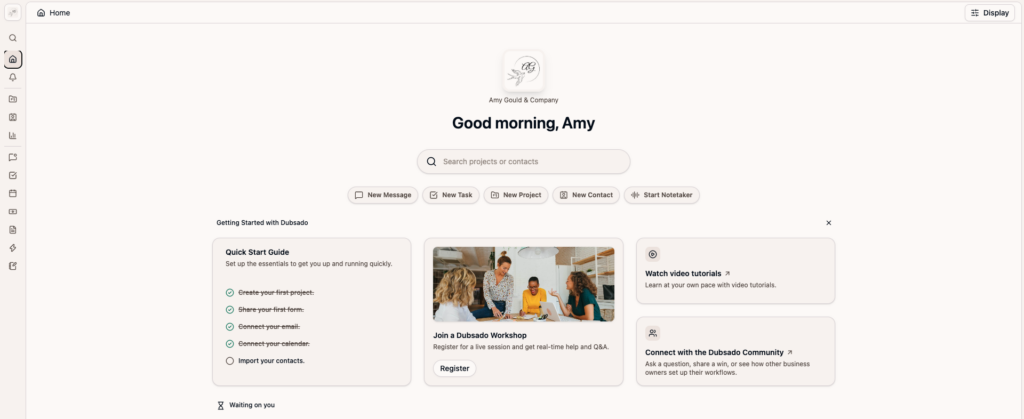
3. Dubsado checkout could open up some REALLY interesting options
Dubsado is also working on checkout functionality that will allow businesses to sell products and services directly through Dubsado.
And I think people are going to find some really creative uses for this.
Imagine you’re a wedding photographer.
Instead of emailing back and forth about an album after the wedding, you could potentially create a beautiful page where your client can choose an album, upgrade it, purchase additional products or add another service.
Photographers could use it for things like:
* Albums and album upgrades
* Prints or other products
* Additional coverage
* Engagement sessions
* Rush turnaround
* Other add-ons
Hair and makeup artists could use checkout for additional services at a preview or on the wedding day, services for attendants, upgrades, touch-up time or other à la carte options.
And this isn’t limited to wedding businesses.
Dubsado is also talking about using checkout to sell digital products, templates, guides, mini offers and other products that can be automatically delivered with a link after purchase.
That potentially means one less tool in your tech stack and a much easier path for an existing client to say, “Yep, I want that too.”
4. Native Kit + Flodesk integrations
This one isn’t as flashy as the new form builder.
But I think a LOT of Dubsado users are going to love it.
Right now, if someone fills out a Dubsado form and says they’d like to join your email list, getting them onto that list usually requires another step.
For example, you can include a question asking whether they want to receive marketing emails. Then you need something like Zapier to check their answer and only send the people who opted in over to your email marketing platform.
It works.
But it’s an unnecessarily complicated workaround.
Dubsado has Kit and Flodesk integrations on the roadmap, along with proper newsletter opt-ins built into the new forms.
So someone could intentionally opt into your marketing and be added to the appropriate email list without the Zapier middleman.
One less Zap to build, pay for, monitor and wonder why it suddenly stopped working?
Yes, please.
5. Project-level payment overrides are coming back
This is one of those features that isn’t going to get nearly as much attention as shiny new forms, but it solves a practical problem.
Sometimes one project needs to work differently.
Maybe you have a special arrangement with a longtime client. Maybe there’s an unusual payment situation. Maybe this particular project simply doesn’t fit the standard payment options you’ve set for your brand.
Dubsado is bringing back the ability to override payment options at the individual project level.
It’s more flexibility for those inevitable situations where your standard process doesn’t quite fit.
And if you run a service business long enough, you know those situations happen.
What else is coming to Dubsado 3.0?
There are several other things on the roadmap I’m watching.
Dubsado is working on a better mobile experience, including an updated app. They’re planning more customization for client portals and eventually want the portal to become more of a communication and collaboration space.
They’re also exploring Dubsado pages that function more like actual landing pages, complete with UTM tracking, Meta Pixel, and Google Analytics support.
That could eventually create a pretty interesting path:
Someone finds your offer → lands on a page built in Dubsado → books or buys → signs → pays → schedules
Without bouncing between five different pieces of software.
There’s also a rebuilt affiliate program coming, along with ongoing interface improvements designed to make 3.0 feel a little warmer and more like the Dubsado people were used to.
And then there’s AI.
Dubsado is working on an MCP connection that would allow tools like ChatGPT and Claude to access information from your Dubsado account.
The first version will be read-only, so theoretically you could ask questions like:
- What needs my attention today?
- Which invoices haven’t been paid?
- How much money did I make last month?
And get an answer based on the information in your actual Dubsado account.
Am I intrigued?
Absolutely.
Am I ready to tell you this is going to completely change how you run your business?
Not yet.
Right now, I think Dubsado may be overselling this one a little bit. I’m not sure if I see the value… yet. I’m waiting to see what it looks like in real life, before I get too excited about it.

So…should you switch to Dubsado 3.0 from 2.0?
At this point?
I think most people can… if you have the bandwidth to learn it.
I’ve been using Dubsado 3.0 and building client systems in it for months, and I’ve found it to be fairly stable.
My hesitation at this point isn’t really about whether 3.0 works.
It’s about timing.
The interface is different. Some things aren’t where you’re used to finding them. You’ll need some time to get comfortable with how things work in 3.0.
If you have that time now, I’d start getting used to it.
Dubsado has made it clear that 3.0 is where they’re headed, and these roadmap updates make me even more confident about that.
But if you’re a wedding photographer heading straight into your busiest season?
Maybe don’t decide that *this* is the perfect week to relearn your CRM.
Dubsado hasn’t announced an end date for 2.0 yet. They’ve specifically said they’ll give users plenty of notice before that happens.
So if your current system is working and you’re slammed, I’d wait until your slower season and make the transition when you have some breathing room.
There’s no prize for being the first one over to Dubsado 3.0
One thing worth mentioning: actually moving from 2.0 to 3.0 doesn’t require you to do anything on your end. (You just need to log in to 3.0. Everything will be there and will function the same way.
But once you’re in 3.0, you might want to rethink your systems (especially as these new features roll out).
- Rebuild your forms with the new builder once it’s out.
- Rework your process once that multiple clients can live on one project.
- Clean out old workflows and templates you don’t use anymore.
- Set up naming conventions and tags that actually make sense so you can find things again. (Dubsado 3.0 will sort your forms and email templates alphabetically or by most recently edited. (If you were like me and had cute little headers in between different types of schedulers and workflows, you’ll want to get rid of them too.)
That’s exactly the kind of work I do in a CRM Audit or a full Done-For-You setup — whether you want a plan to follow yourself or want me to build it all for you.
What I’m still waiting for
There are still a couple of things I’d really like to see Dubsado tackle.
Scheduling for multiple team members is a big one.
If you have multiple people who take appointments, I’d love to see Dubsado make it easier to schedule based on more than one person’s availability.
And paid appointments are still a bit janky in my opinion.
They’re still a little janky. They work as long as you build an abandoned cart sequence.
I’d love to see the scheduling and payment experience become as seamless as some of the other experiences Dubsado is building in 3.0.
Because if we’re creating these gorgeous, multi-page client journeys, the scheduling experience needs to keep up.
Frequently Asked Questions
For most people, yes. If you have the bandwidth to learn it. The interface is different, and some things have moved, so give yourself a little time to get comfortable. If you’re heading into your busiest season, I’d wait for a slower stretch rather than trying to relearn your CRM mid-chaos.
The roadmap doesn’t give exact dates. Coming updates include multiple clients on one project, a completely rebuilt form builder with multi-page forms, built-in checkout for selling products and add-ons, native Kit and Flodesk integrations, and project-level payment overrides.
Not yet. (Hopefully, soon!) It’s on the roadmap so fingers crossed it happens in the next few months. I know a lot of my clients have been asking for it.
Not yet, and Dubsado hasn’t announced an end date. They’ve said they’ll give users plenty of notice before that happens, so there’s no need to rush.
No. The migration itself doesn’t require you to do anything (except login to 3.0). However, now is a great natural point to rethink your systems instead of just recreating what you already had. If you want a second set of eyes on what to change, that’s exactly what a System Strategy Session is for.
I’m much more excited about Dubsado 3.0 than I was earlier this year
When Dubsado 3.0 first came out, there were simply too many things that weren’t ready for everyone yet.
That’s changing.
What excites me most about this roadmap isn’t that Dubsado is adding a bunch of shiny features.
It’s that they’re working on things users have been asking them to improve for years.
- Multiple clients.
- Better forms.
- More flexible client experiences.
- Better integrations.
- More ways to sell.
- More control over how your systems actually work.
Those are meaningful improvements.
There are still things I want to see, and I’ll always care more about how these features work in a real business than how exciting they sound in an announcement.
But after spending months working in Dubsado 3.0 and seeing where they’re taking it?
I’m excited.
And I’m really excited about what I’m going to be able to build for my clients with it.


+ view comments . . .