

If you’ve been side‑eyeing online schedulers because you’re afraid they’ll feel cold, robotic, or like you’re handing over the keys to your calendar… you’re not alone. So many creative, service-based business owners avoid tools like the Dubsado scheduler because they don’t want to seem unapproachable or booked solid at random times. The thing is, when your scheduler is set up with intention, it actually gives you more control over your time, not less—and it can feel warm, welcoming, and very you. Let’s walk through how to set up the Dubsado scheduler so it supports your boundaries, your energy, and the way you actually work.
Here’s What I’m Talking About
In this post (and the video that goes with it), I’m breaking down:
Why an online scheduler doesn’t have to feel cold or impersonal
How to structure your availability so you stay in control of your calendar
Step-by-step: setting up a Dubsado scheduler template
The advanced settings that protect your time and prevent awkward overlaps
How your external calendar (Google, Apple, Outlook) and Dubsado actually talk to each other
Practical calendar habits that keep you from getting double-booked
Who I Am (And Why I Care About Your Calendar)
I’m Amy Pearson, the systems strategist behind Amy Gould & Company, based in Grand Haven, Michigan. I help service-based and creative business owners (photographers, home stagers, designers, and other makers of beautiful things) set up Dubsado systems that feel supportive and human, not rigid or robotic.
Through Done For You and Done With You Dubsado setups, plus System Strategy Sessions, I spend a lot of time inside other people’s workflows. The same worries come up over and over:
“I don’t want clients booking whenever they want.”
“I’m worried I’ll lose control of my calendar.”
“I don’t want to feel like I’m pushing people away by sending a link.”
Those are valid concerns. But the good news is: none of them are actually caused by the Dubsado scheduler itself. They’re caused by a scheduler that hasn’t been set up with intention. Once you design it around your real life, it becomes one of the most supportive tools in your business.
Rather Watch This Post?
Prefer to see this in action instead of reading about it? You can hear me walk through the entire Dubsado scheduler setup—and watch me click through everything on screen—in this video episode.
In the video, I show you exactly where to click, what settings I recommend for most service providers, and a few “learned the hard way” stories about what not to do with your calendar connections.
Why Your Scheduler Isn’t The Problem (It’s The Setup)
Let’s start with the mindset piece, because it’s huge.
Most people think:
If I turn on an online scheduler, suddenly anyone can book me at any time, and I’ll spend my days reacting to random appointments.
That only happens when the scheduler is set up as an open door instead of a curated entrance. A well-built scheduler does not replace human connection. It eliminates friction.
Think about the last time you booked a haircut or a dentist appointment online. You probably loved that you could:
- Click a button
- See what was available
- Pick a time
- Get a confirmation email and calendar invite
No awkward phone calls. No “does Tuesday at 10 work?” back-and-forth emails. Just clarity.
The same thing happens for your clients when your Dubsado scheduler is set up well.
That’s not cold. That’s professional and trustworthy. You are not saying, “Don’t talk to me.” You’re saying, “Here’s how to work with me.”
“You’re not handing over your calendar—you’re designing it. A well-built scheduler doesn’t replace human connection. It replaces friction.”
– Amy Pearson
Designing Availability That Protects Your Energy
Now let’s talk about the part that makes most people nervous: availability.
If you plug in 9–5, Monday through Friday, and walk away, you’re right—your calendar can end up peppered with calls at random times. That’s when you feel like the tool is driving your day instead of you.
Inside Dubsado’s scheduler template, you can be very specific about when you’ll take appointments and when you won’t.
For example, you might decide:
- Tuesdays and Wednesdays are client-facing days from 10–5
- Fridays are light—maybe 10–12 only
- Mondays and Thursdays are completely off-limits so you can focus on CEO work, deep client projects, or just breathing room
You can set this up by choosing your appointment duration, then defining exactly which days and times are bookable.
You can choose:
- Rolling availability (like “only show the next 14 days”) so people don’t book months out before you’re ready. Fixed date ranges, which are perfect for things like mini sessions or seasonal offers, or let people book as far out as you want.
- You can tell the scheuduler how soon someone can book. (Want two days’ notice? Just set it to prevent booking less than 2 days out, and you’re golden.)
- You can also tell it that you’d like 30 minutes in between each appointment and that you only want to take two of a certain type of appointment in a day if you know that’s an appointment that’s draining for you.
This is designed control. You’re deciding ahead of time how you want your week to feel, then letting the scheduler enforce that plan for you.
If you’re already feeling like your whole business needs this level of intentional structure, working with me in a System Strategy Session or a more comprehensive Done For You setup is often the fastest way to get everything aligned (scheduler, workflows, emails, and all). Book a discovery call if you’re ready to get Dubsado working for you.
Here’s How to Set Up a Dubsado Scheduler Step-By-Step
Where to find your schedulers in Dubsado 2.0
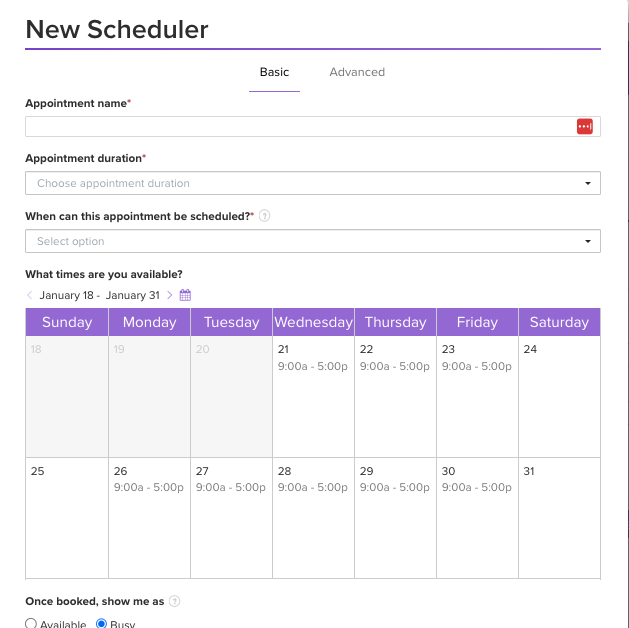
Inside Dubsado, your scheduler lives under Templates → Scheduler → Add Template. From there, you’re essentially answering a series of questions about how you want this appointment type to behave.
Then Head to the Basic Settings Tab to Start Setting Up Your Scheduler
First, you’ll:
- Name the scheduler in a way that clearly describes the appointment (for example: “Wedding Consultation Call” or “Design Intensive Discovery Call”)
- Choose the appointment duration (30 minutes, 60 minutes, etc.)
- Decide how far into the future someone can book (a rolling window like 14 days, indefinitely, or specific dates)
Next, you’ll define availability for this scheduler:
- Which days of the week can people book this specific type of appointment?
- What times on those days?
- Are there days you never want this type of appointment?
Then you’ll tell Dubsado what happens once someone books:
- Should that time be marked as taken so other schedulers can’t use it? Or should it stay open for multiple bookings (for example, if you’re running a group class or webinar)?
- You’ll also choose the location—Zoom, Google Meet, phone call, in person—so that smart fields can pull that info into your confirmation and reminder emails automatically.
- If you like, you can attach a specific “Invite to Schedule” email template here too. This is especially handy if you’re building workflows and want a particular email to go out every time this scheduler is used.
Advanced Settings That Keep You From Getting Overbooked and Overloaded
The magic of the scheduler is in the advanced settings. This is where you protect your time and sanity.
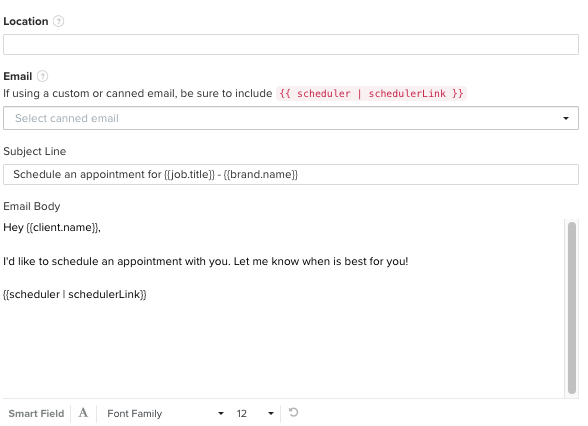
Inside the Advanced tab, you can:
- Require a minimum notice period (for example, “no one can book less than 24 hours in advance”)
- Add buffer time before and after appointments so you’re not jumping from call to call (15 minutes on each side is a great starting place)
- Choose the increments in which available time slots are displayed. (Be sure to figure out what increment needs to be used to allow for the appointment time and any padding.)
- Limit how many of these appointments you’ll take per day
- Limit how many times the scheduler can be used in total (great for webinars, mini sessions, or anything with a limited number of spots)
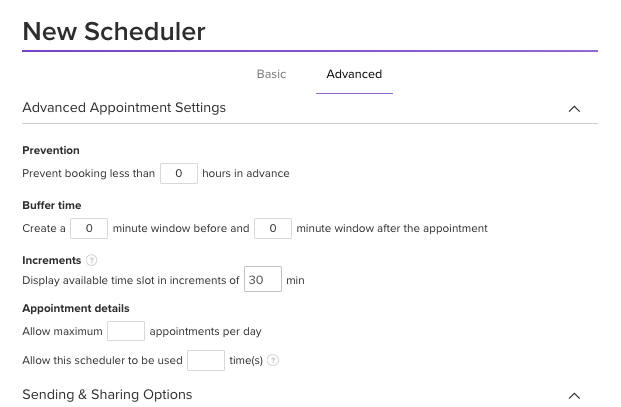
You’ll also set:
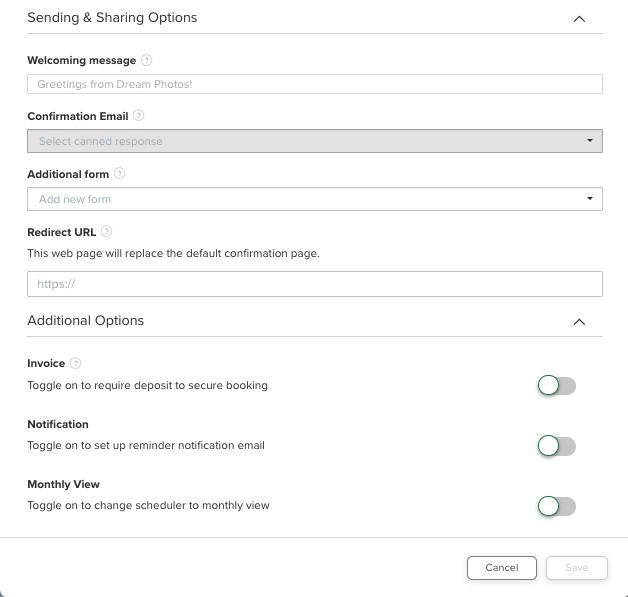
- A welcome message that appears at the top of the scheduler (this is your chance to sound like a real human and reassure people they’re in the right place)
- The confirmation email someone receives right after booking
- An optional form to collect information from new leads and add them to your Dubsado as a new project.
- Require payment to book the appointment
- Reminder emails—like one 24 hours before and one an hour before—to reduce no-shows
All of these pieces work together to create a smooth, warm experience for your clients. And you only have to set them up once. From that point forward, your scheduler is quietly supporting you behind the scenes.
If Setting Up Dubsado Feels Overwhelming, I Can Help
If setting all of this up feels overwhelming, this is exactly the kind of thing we do together in my Done With You implementation, or I can take it completely off your plate with a Done For You Dubsado setup. Book a free discovery call with me to learn more.
How Your Calendar And Dubsado Work Together (So You Don’t Get Double-Booked)
The last piece of this puzzle is understanding how your external calendar (Google, Apple, Outlook) and Dubsado talk to each other. This is where it can feel confusing or where things can go haywire.
Your Dubsado scheduler looks at your connected calendar and asks: “Is this person busy or not busy at this time?” That’s it.
On your calendar, most tools let you mark events as:
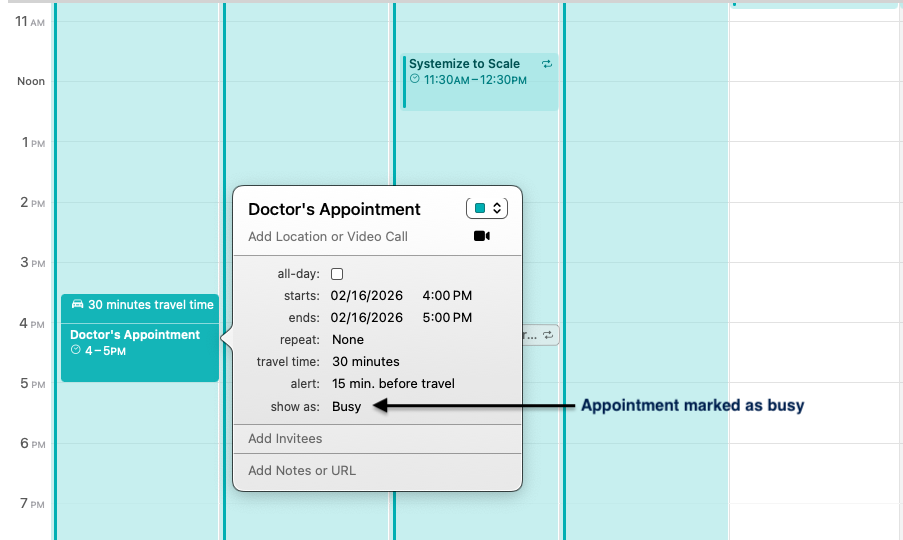
Busy: no one else can book you during this time
Not busy (or free): you can still see it on your calendar, but your scheduler will treat that time as open
That means you can:
- Time block your week with “focus time” marked as Free/Not Busy so you see it, but your scheduler doesn’t block it
- Mark carpool pickups, your partner’s errands, or recurring course calls as Not Busy if you’re still okay taking client calls during those times
- Mark doctor appointments, hair appointments, and travel time as Busy so Dubsado knows those blocks are truly off-limits
A Few Tips to Keep Your Scheduler Working Flawlessly
Double-check your calendar settings inside Dubsado (under Calendar → Calendar Settings) to make sure the correct calendar is actually linked.
If you have project management tools or other apps pushing due dates onto your main calendar, consider connecting them to a different calendar than the one Dubsado is using. Otherwise, your content deadlines and internal tasks can accidentally block all your appointment availability.
(I learned that one the hard way when someone pointed out I had no openings for two months).
You Don’t Have to Log In to Dubsado to Block Off a Day (or Multiple Days)
Finally, remember: you do not have to log into Dubsado to block off a day. If you want to take a Friday in the summer off from calls, you can just put an all-day Busy event on your connected calendar, make it recurring for every Friday until the end of August, and Dubsado will respect that.
Once your calendar and scheduler are playing nicely together, your availability manages itself. You decide the rules once; your system enforces them for you.
Conclusion: You’re Not Losing Control—You’re Designing It
Using the Dubsado scheduler isn’t about being less accessible. It’s about being more intentional. When you:
- Define when you actually want to take calls
- Use advanced settings to build in buffer time and limits
- Connect your calendar with clear Busy vs. Not Busy rules
- Write warm, clear confirmation and reminder emails
…your scheduler starts feeling less like a robot and more like a very organized assistant who always has your back. You’re not handing over your calendar. You’re designing it so it fits the way you want to work.
If you’re realizing your current scheduler—or your whole Dubsado setup—doesn’t really match how you want to work, you don’t have to figure it out alone. You can book a quick discovery call, and we’ll talk about whether a Done For You setup, a collaborative Done With You build, or a focused System Strategy Session is the best fit for you, your capacity, and your goals. Let’s make your systems feel as thoughtful and intentional as the work you do for your clients.


+ view comments . . .